Interface Preview
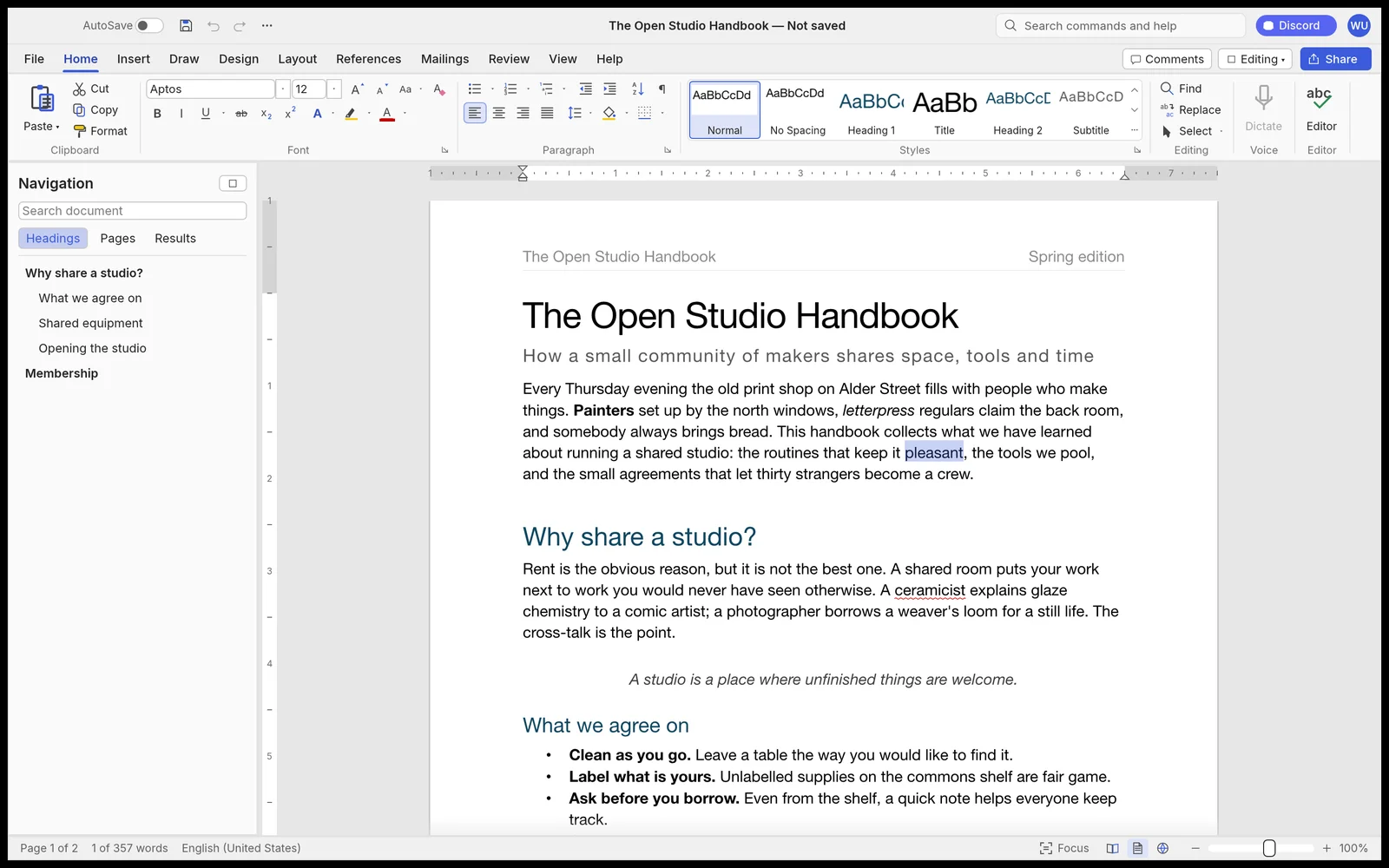
Click an image to view it full size.
Pros / Strengths
- Single codebase runs on macOS, Windows, Linux, BSD, and the browser via WebAssembly — no Electron
- Extremely fast performance (relayout of a 188-page document in ~1.4 ms)
- Open-source with solid core features: .docx support, track changes, comments, citations, and offline spell/grammar check
Cons / Limitations
- Still near-alpha stage with only ~62% feature parity to Microsoft Word
- Not stable or complete enough for important or production documents
- Interface still feels rough in places (dense ribbon, clunky font/size controls, high vertical space usage)
Software Similar to WordCraft
Explore other tools for a similar workflow.
About WordCraft
If you’re comfortable with Microsoft Word but still wish for something lighter, completely free, and capable of running natively on Linux — or even directly in the browser — Wordcraft from the ArtCraft team is one of the more interesting projects currently in development.
What Is Wordcraft?
Wordcraft is an open-source effort to recreate the Microsoft Word experience from the ground up, written entirely in Rust. The goal is clear: keep the familiar feel of Word while shedding the bloat and platform limitations. A single codebase runs on macOS, Windows, Linux, BSD, and in the browser via WebAssembly — no Electron involved.
Interface and Everyday Experience
- The team has put real effort into familiarity. The ribbon interface, keyboard shortcuts, and live style previews closely mirror Word, so most users can switch over without a steep learning curve.That said, after spending time with the current build, several design details still feel unfinished:
- The ribbon is functional but dense. Group spacing is tight, and the overall visual hierarchy doesn’t feel as refined as modern Word. It works, but it doesn’t yet feel effortless.
- Font and size controls are usable, yet the interaction feels slightly clunky compared to polished commercial editors.
- The Styles gallery shows live previews, which is great, but the thumbnails are quite small and the section feels compressed.
- The top bar includes a Discord button and user avatar that feel a bit out of place in a document editor — they break the focus slightly.
- Vertical space usage is high. Between the title bar, ribbon, and optional navigation pane, the actual writing area gets squeezed more than it should on smaller screens.
None of these are deal-breakers, but they show the interface still needs another round of careful UX polishing.
Document Formats and Core Features
Wordcraft reads and writes .docx files and also supports .odt, .rtf, .html, .md, and .txt. PDF export preserves selectable text.Advanced writing tools are already present:
- Track changes and margin comments
- Automatic table of contents and footnotes
- Citation support for APA, MLA, Chicago, and IEEE
- Tables, CSV-based mail merge
- Watermarks, drop caps, and line numbering
Performance That Stands Out
This is one of the project’s strongest early signals. Relayout of a 188-page document takes roughly 1.4 milliseconds. Spell-check and grammar checking work fully offline.Beyond the GUI, Wordcraft includes a CLI and an MCP server with 389 commands, opening the door for AI agents to compose and edit documents programmatically.Where Things Stand TodayThe project is still young. The author estimates roughly 62% feature parity with Microsoft Word and places it near alpha status. It’s not ready to replace Word for critical documents or production work that demands rock-solid stability.
Pricing
| Plan | Price | Details |
|---|---|---|
| Free | $0 | Full open-source WordCraft app (desktop + browser), all current features, offline use, no account required |
Leave a Comment